

GTU Form Creation Editor
With the requests of the Quality & Statistics Unit at Gebze Technical University, I have created this form builder with drag-and-drop support using .NET. All the form creation process is dynamic and some components of the form have validation which comes from the dataset as lists. It's actively used by the Quality & Statistics Unit to create new forms and replace 700+ legacy ones.
- .NET
- C#
- HTML5
- CSS
- JavaScript
- MSSQL
- Git
- GitHub
Summary. I built this form builder with drag-and-drop support using the .NET Framework. Form creation is dynamic, and some fields validate against lists pulled from the database. The Quality and Statistics Unit uses it to create new forms, and it replaced more than 700 legacy ones.
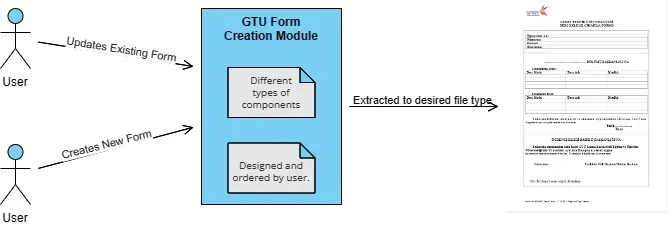

Each component has its own options. A dropdown, for example, validates against values that come from the database.
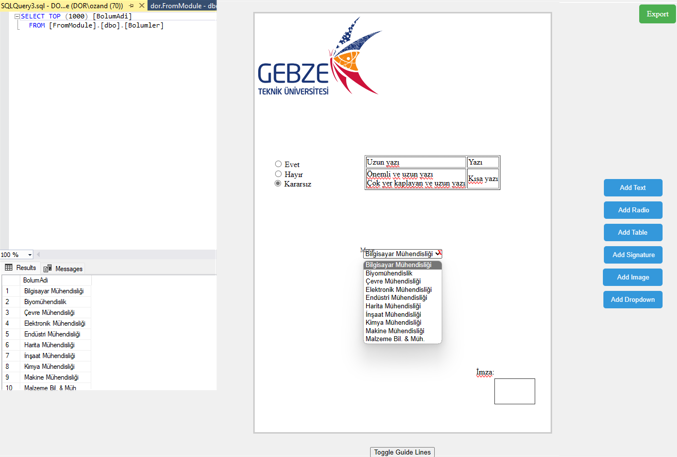
The back-end runs on Microsoft SQL Server, connected to the unit's existing tables for the dropdown lists and for storing each form.

Forms are stored with their properties, so users can filter them, create new ones, or edit existing ones.
After the demo video I spent another month improving the styling and adding features, then helped other developers integrate the module into the school system. I am proud to have contributed to my university.
Questions
What does the form builder do?
It lets staff build forms by dragging and dropping fields, with validation pulled from the database, instead of hand-coding each form.
Is it actually used?
Yes. The Quality and Statistics Unit at Gebze Technical University uses it, and it replaced more than 700 legacy forms.
What is it built with?
The .NET Framework on the back-end with Microsoft SQL Server, and a drag-and-drop front-end.